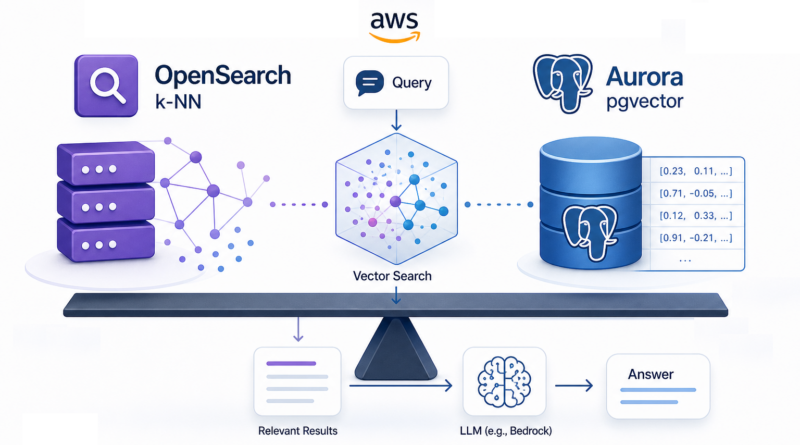
OpenSearch k-NN vs. Aurora pgvector: Choosing Your Vector Store on AWS
A practical decision guide for architects building Retrieval-Augmented Generation (RAG) applications on AWS.
Modern applications especially those involving Generative AI no longer rely on a single data model.
Traditionally, architects chose between:
- Relational databases (RDS) for structured, transactional data
- NoSQL databases (DynamoDB) for scale and flexibility
Today, a third paradigm has emerged: Vector Databases, used for semantic retrieval.
The following figure illustrates a simple DAR (Decision Analysis & Resolution) Matrix to help in selecting the proper Vector Store on AWS.
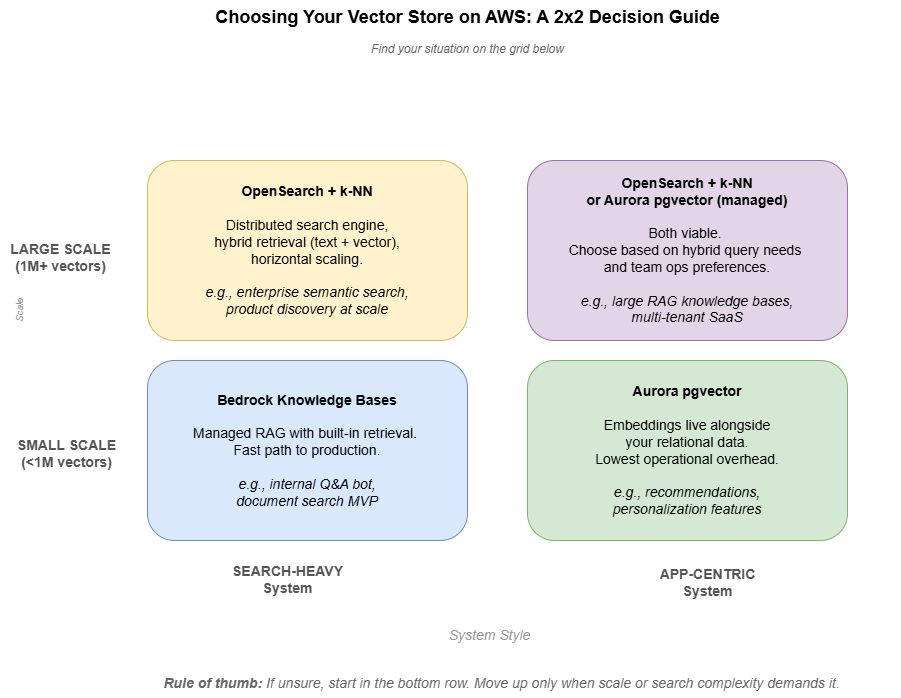
In practice, this means your application is no longer choosing a single database, but orchestrating multiple data access patterns. This naturally leads to a practical question:
If you need a vector store on AWS, should you use OpenSearch or Aurora PostgreSQL with pgvector?
OpenSearch with k-NN: Search-First Architecture
Amazon OpenSearch Service supports vector search via k-Nearest Neighbors (k-NN).
Under the hood, this relies on approximate nearest neighbor (ANN) algorithms such as HNSW, balancing query speed and recall.
Key characteristics:
- Designed for distributed search workloads
- Supports hybrid queries (keyword + vector)
- Scales horizontally across nodes and shards
When OpenSearch shines:
- You need hybrid retrieval (text + semantic search)
- Your dataset grows to millions of vectors or more
- Search is a core system capability
- You are already operating a search layer
A useful mental model:
OpenSearch with k-NN treats meaning-as-distance the way traditional search treats keywords-as-tokens.
Aurora PostgreSQL + pgvector: Application-First Simplicity
Aurora PostgreSQL supports vector search via the pgvector extension, allowing embeddings to live alongside relational data.
pgvector supports multiple index types, including IVFFlat and HNSW, with HNSW generally preferred for production workloads due to better recall and query performance.
Key characteristics:
- Stores embeddings inside standard PostgreSQL tables
- Supports similarity search using operators like
<=> - Combines SQL filtering + vector similarity
Example query:
SELECT id, name, price
FROM products
WHERE price < 100
ORDER BY description_embedding <=> '[0.12, 0.34, ...]'::vector
LIMIT 5;
When pgvector shines:
- You want one system instead of two
- Your scale is moderate
- You need tight coupling between business data + embeddings
- Your team already operates PostgreSQL
In short:
pgvector is ideal when vector search is a feature inside your application, not a standalone system.
Decision Matrix
| Factor | OpenSearch (k-NN) | Aurora pgvector |
|---|---|---|
| Architecture style | Search-first | Application-first |
| Scale | High (millions+) | Moderate |
| Query type | Hybrid (text + vector) | SQL + vector |
| Operational complexity | Higher | Lower |
| Deployment model | Separate cluster | Integrated DB |
| Best use case | Search-heavy systems | App-centric systems |
Cost Reality (High-Level)
Cost behavior changes with scale, and this is where the two approaches differ.
- At small scale (tens of thousands of vectors):
pgvector is typically more cost-efficient since it runs inside an existing database. - At larger scale (millions of vectors):
OpenSearch becomes more efficient due to its distributed architecture. - OpenSearch usually requires multiple nodes for production setups
- pgvector scales vertically first, which can become limiting over time
⚠️ Note: AWS pricing changes frequently. Always validate using the AWS Pricing Calculator.
The key is understanding the shape of the cost curve, not exact numbers.
A Simple Example: The Same Query, Two Ways
Imagine an e-commerce application where you want to find products similar to a user query, filtered by price under $100.
With Aurora pgvector
SELECT id, name, price
FROM products
WHERE price < 100
ORDER BY description_embedding <=> '[0.12, 0.34, ...]'::vector
LIMIT 5;
With OpenSearch k-NN
response = client.search(index="products", body={
  "size": 5,
  "query": {
    "bool": {
      "filter": [{"range": {"price": {"lt": 100}}}],
      "must": [{
        "knn": {
          "description_embedding": {
            "vector": [0.12, 0.34, ...],
            "k": 5
          }
        }
      }]
    }
  }
})
Both approaches work. The difference is where the complexity lives:
- With pgvector, your existing database does more
- With OpenSearch, you’re operating a dedicated search layer
Where Amazon Bedrock Fits?
Amazon Bedrock is the fully managed AWS service that provides a single API to access high-performing foundation models (FMs) from companies like Anthropic, Meta, Mistral, and Amazon, along with tools for building generative AI applications. It is serverless, secure, and enables customization using proprietary data via fine-tuning and retrieval-augmented generation (RAG).
In a typical RAG architecture:
- User sends a query
- Application retrieves relevant context from a vector store
- Context is passed to a foundation model
- The model generates a grounded response
Amazon Bedrock provides model inference, not storage.
AWS also offers Bedrock Knowledge Bases, which handle:
- Embeddings generation
- Retrieval
- Integration with vector storage
Trade-offs to consider:
- Less control over embedding strategy
- Limited ability to fine-tune retrieval pipelines
- Simpler setup, but less flexibility at scale
- Additional per-query costs beyond storage
When NOT to Use a Vector Database
Vector databases are powerful—but not universal.
Avoid using them when:
- You need strict transactional consistency → use RDS
- You need simple key-based access → use DynamoDB
- Your queries are exact and deterministic
Example:
A payment system should never rely on vector similarity—it requires exact, consistent results.
Final Verdict
There is no universal winner—only context.
- Use OpenSearch when:
- Search is a primary system capability
- You need hybrid retrieval and scale
- Use Aurora pgvector when:
- You want simplicity
- Vector search is embedded in application logic
- Use Bedrock Knowledge Bases when:
- You want a managed, quick-start solution
Closing Thoughts
The “best” vector store on AWS isn’t a feature comparison—it’s a question about where your system’s complexity already lives.
If your team already operates PostgreSQL, pgvector minimizes moving parts.
If your system already depends on search infrastructure, OpenSearch extends it naturally.
If you want a fast path to a working RAG pipeline, managed options like Knowledge Bases are often the right starting point.
In all cases, vector search isn’t replacing traditional databases—it’s joining them.
Modern architectures are not about choosing one system, but about combining multiple data paradigms in a way your team can realistically operate and evolve.